

NEW HERE? TAKE A TOUR!
NEED HELP? guru
9 Gurus available
0 Gurus online
Home » Help » Profile / Nickpage » MyPhotos: How do I add a Description?

Category: Profile / Nickpage

MyPhotos: How do I add a Description?

In order to add a Description to your photos on your profile, just go to:

  1. MySHOE
  2. Manage Photos

Select the photo you would like to add a description to and right click on it. Now you will see further options.
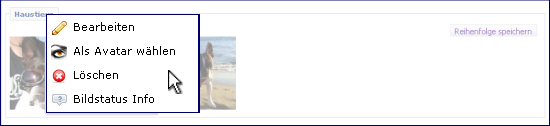
MyPhoto: How do I add a description?

Click on Edit and add your description.

Last modified: Aug 22 09

Was this helpful?

Was this article helpful?

Current rating: star_greystar_greystar_greystar_greystar_grey

Related Articles


Lesbian Social Networking Site